What to Do When AI Coding Tasks Exceed Context Limits or Output Length?
When I use the Claude Sonnet 4.6 model for programming, I frequently encounter two situations:
- A single session’s task exceeds the context limit or output length, causing a significant drop in code quality.
- AI generates an excessively long response, triggering “Sorry, the response hit the length limit. Please rephrase your prompt.”
GitHub Codespaces has a very useful feature: you can see the token consumption status for the current session.
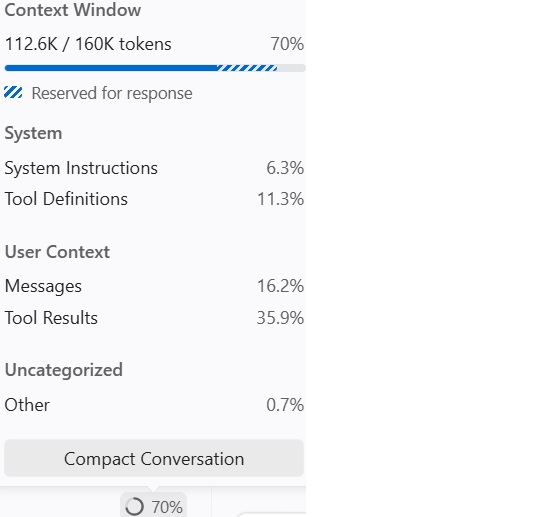
My solution is: before exceeding the context limit, open a new session and re-describe the unfinished task.
I strongly recommend never letting a single session’s task exceed the context limit, otherwise it will cause a significant drop in AI code quality. In my own development experience, I’ve encountered similar situations more than once.
Although everyone has the awareness: too long context increases the probability of AI hallucinations. I don’t think it’s caused by the model’s own capabilities; 160K tokens are already sufficient. But another possibility is: it’s caused by Copilot’s context management strategy.
I Asked Gemini 3.5 Flash and Got This Response:
When coding quality drops significantly after exceeding 160K tokens - this is actually a classic “scapegoat” phenomenon between underlying model capabilities and engineering wrappers.
This is mainly caused by GitHub Copilot’s context handling (engineering truncation, retrieval-augmented suppression, etc.), not the limits of the Claude 3.5 Sonnet model itself.
- Core Reason: Copilot’s “Context Management” Strategy Claude 3.5 Sonnet itself has a 200K token context window. Under ideal conditions, it maintains extremely high “Needle In A Haystack” retrieval capabilities across the entire 200K range. But inside Copilot, things get complicated:
Sliding Window and Implicit Truncation: To save token costs (API fees) and ensure response speed, Copilot rarely sends the entire 160K+ raw conversation history word-for-word to Anthropic’s servers. It uses special algorithms for summarization, sliding window truncation, or vector retrieval (RAG).
Information Distortion: When your session is extremely long, what Copilot sends to Claude may no longer be the code you originally wrote, but “second-hand context” compressed and refined by Copilot. This engineering processing causes logical gaps in the code the model receives, and code quality naturally snowballs downward.
System Prompt Interference: Copilot injects very heavy system prompts (to constrain its behavior as an IDE programming assistant). When the context is extremely long, the model may experience conflicts in attention allocation between “following the Copilot framework” and “understanding user’s long code”.
My Solution: Let AI Design Phased Tasks, Open New Sessions, and Re-describe New Stage Tasks
Taking code review as an example:
- In Session 1: You can first let AI perform a code review and sort the issues to be fixed.
- Get the review conclusions first; then open a new Session 2, with the prompt being the review conclusions, and let AI fix the P0 issues.
- Open another Session 3, input the code review conclusions again, and let AI continue fixing P1 issues.
This way, you split one code review + bug fix into different sessions, which not only ensures coding quality but also reduces context consumption (reducing your costs).
A Brief About Me
I’ve worked at NetEase Games, Baidu, Tencent (8 years), and Meituan (nearly 7 years), leading large-scale R&D projects and managing teams of 100+ engineers.
Currently, I’m pursuing entrepreneurship in the AI field.
Why? The world runs on uncertainty — staying in corporate roles too long breeds addiction to certainty. Starting an AI venture is like setting sail into uncharted waters.
Feel free to reach out: mailto:HummingbirdLabs@outlook.com.